MEPCO Bill Check Online 2026 – View & Download Your Bill
Search Your Electricity Bill
If you live in Multan, Khanewal, Vehari, Lodhran, Bahawalpur, Dera Ghazi Khan, Muzaffargarh, or the surrounding areas of South Punjab and want to check your MEPCO bill online, you’ve come to the right place. Here you can view and download your bill in just a few seconds. You just need to enter your 14-digit reference number or 10-digit consumer ID in the provided bill checker box and click “Check Now.” Your latest MEPCO bill will instantly open on the official website.
Along with this, the Government of Pakistan completely changed the layout of WAPDA bills in June 2026 so that every consumer can scan the QR codes at home to pay their bills, check and apply for subsidies to reduce bill charges, and the detailed method for using all of these is explained here. You can explore each point yourself and implement it with confidence, because all the information provided here is completely real and officially verified.
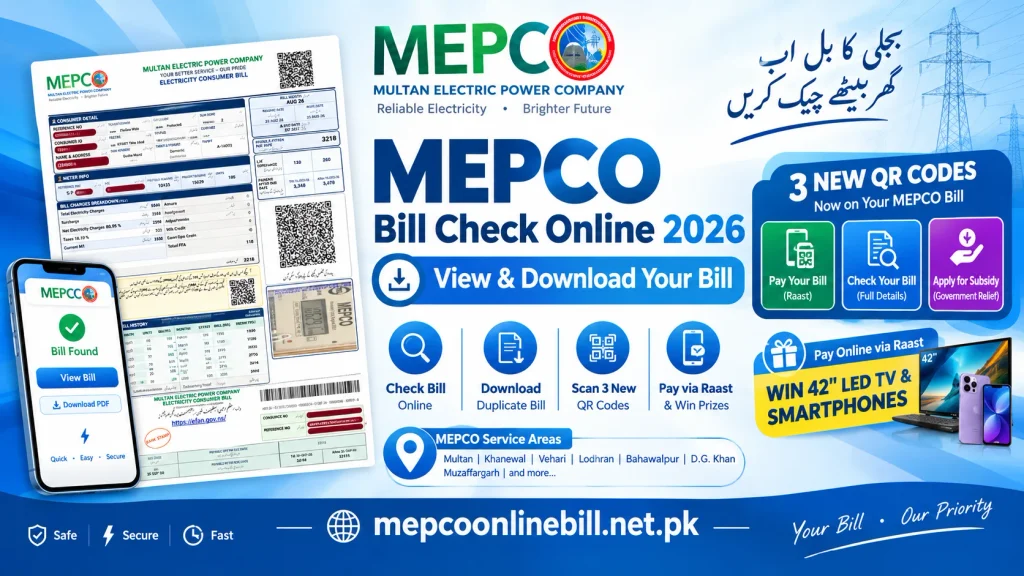
How to Check MEPCO Bill Online – Step-by-Step Guide
Checking your MEPCO bill online has now become very easy. You can do it from home, the office, or while traveling, and you can view and download your duplicate bill in just a few minutes. You no longer need lengthy details. If you don’t know how to use this method, don’t worry, everything is explained step by step here. Just follow it and check your bill right away.
Check MEPCO Bill with Reference Number
Check MEPCO Bill with Consumer ID
Check MEPCO Bill via SMS
If you don’t have a net package, you can still check your bill using this simple method. For this, you just need a balance of 5 to 10 rupees in your phone.
How to Find Your Identity Numbers & Print Duplicate MEPCO Bill
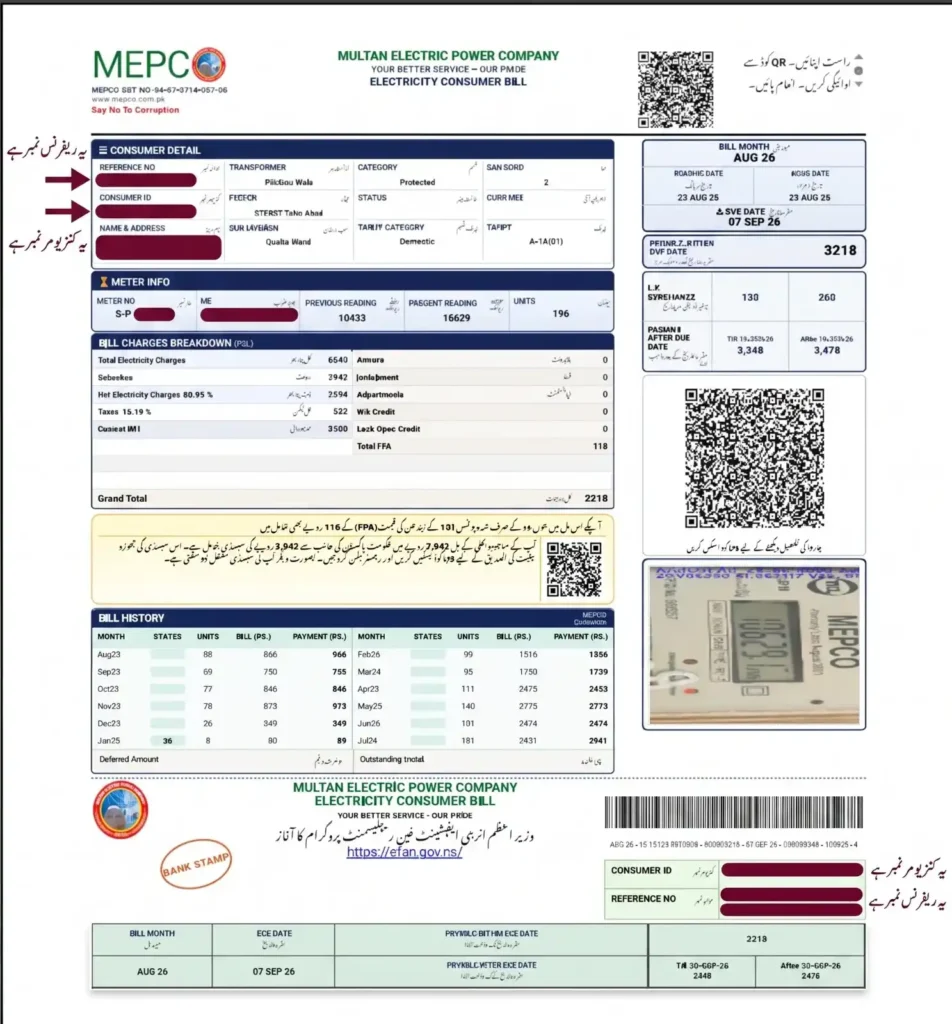
Often, when users first check their online MEPCO bill, they complain that they don’t have a reference number. To solve this very problem for everyone, we’ve provided detailed information here with a clearly marked picture showing exactly where your reference number and consumer ID are located. In addition, we’ve explained how to download and print your bill and how to save it, so that it’s easy for you.
Locate the 14-digit reference number: You can find it in the top left corner of your bill. There will be a large box with your consumer details and a number like 13 15111 1234567 U/R. This is your main account number, which is also called your reference number.
Locate the 10-Digit Consumer ID: This is also written in the same consumer details box, on the second line just below the reference number. It’s a 10-digit code (1122330000). You can also use this to check your bill; it’s easier to remember.
MEPCO Duplicate Bill Print and Download
Step 1: Load the Bill:
First, follow the method given above to open your MEPCO bill.
Step 2: Save as PDF:
After opening the bill, click the green Print button on the screen and save the file to your mobile or laptop under the name “Duplicate Bill” or “Copy Bill.” If you want to save the file under a different name, you can do so at your convenience.
Step 3: Printout:
If you want to get a copy made, first go to your phone’s file manager and open the document. Then search for the name you saved the file under or browse until you find it, and take it to any nearby print shop to have it printed.
Step 4: Deposit the Bill:
This duplicate copy is 100% legal. You can take it to any nearby commercial bank, post office, or EasyPaisa/JazzCash shop and easily deposit the bill.
MEPCO Bill QR Codes: Pay, Check and Apply for Subsidy
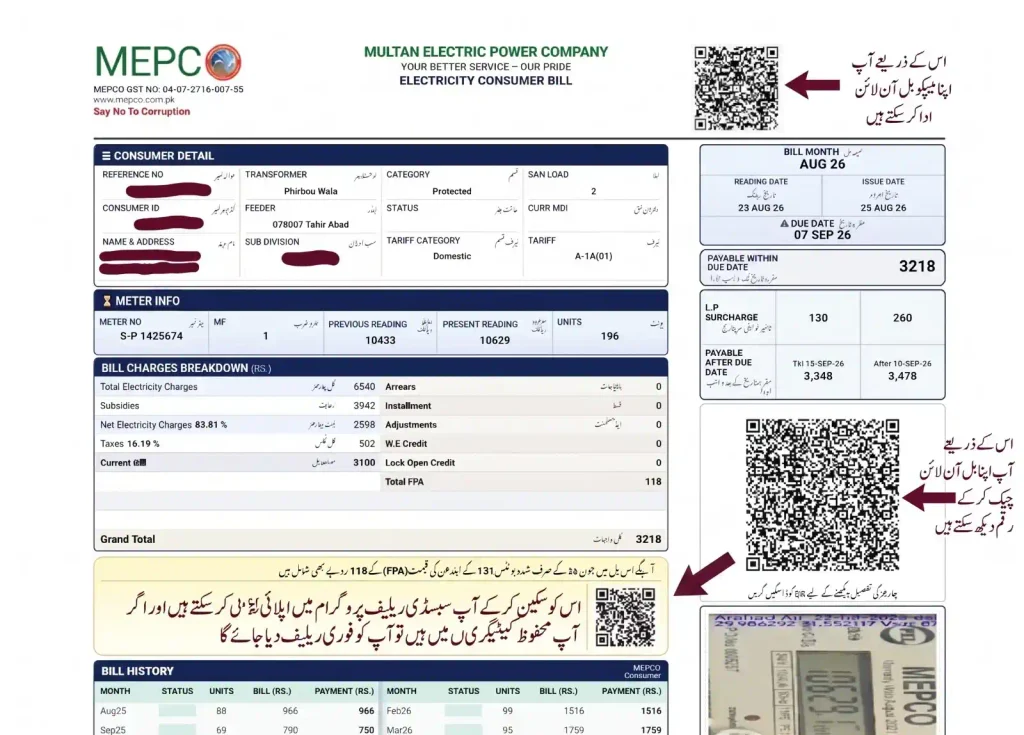
The three advanced QR codes on the new MEPCO bill layout have completely changed the way bills are checked and paid. The main purpose of these codes is to save the user’s valuable time and make payments easier so you can avoid any online fraud and conveniently apply for the subsidy relief program from home. If you don’t know how to use and scan these codes or what each QR box is for, don’t worry. Below, we’ve provided a complete guide to their use and the essential apps required for them, step by step, so you can handle every task yourself without any mistakes and avoid standing in long lines for
First QR Code – Pay Your MEPCO Bill
Second QR Code – Check Your MEPCO Bill
Step 1: Open Mobile Camera:
If you want to see the bill amount and the hidden taxes (FPA, GST, TV Fee) behind it, open your mobile’s default camera.
Step 2: Scan Second QR Code:
Scan the second QR code located in the middle right side of the bill.
Step 3: Open Digital Link:
As soon as it scans, an official PITC web link will appear on your screen; just click on it.
Step 4: View Bill Breakdown:
This link will take you directly to MEPCO’s live server, where you can see your total bill amount, the date of the previous reading, and a complete breakdown of taxes.
Third QR Code – Apply for Bill Subsidy
MEPCO Bill Payment – Pay Online & Win a Smartphone, LED TV (Raast Lucky Draw)
Now you don’t have to stand in long lines in the sun to pay your bill. Under the new government and MEPCO company rules, you can pay your bill in seconds from home or on the go. Whether the bank’s server is down or the shop is far away, you always have both online and offline options so your bill can be paid safely before the due date. And the best news is that if you pay your bill online using the specified method, you can enter MEPCO’s official lucky draw and win valuable prizes.
How to Pay MEPCO Bill Online via Mobile Wallets (EasyPaisa & JazzCash)
Open the EasyPaisa or JazzCash app on your mobile and log in.
Then click on the “Bill Payment” or “Electricity” icon on the main dashboard.
Now, find and select MEPCO from the list of companies.
Then, enter your 14-digit bill reference number or open the camera to scan the QR code and click “Pay Now.”
How to Pay MEPCO Bill Online via Bank Apps & Win Prizes (Raast Lucky Draw)
If you pay your bill through a bank app, you can win a 42-inch LED TV, a smartphone, and AirPods according to MEPCO’s official scheme. If you also want to take advantage of this great opportunity, here is the step-by-step method:
Open the official mobile app of the bank you use (HBL, Meezan, UBL, ABL, etc.).
Open the app’s camera and scan the QR code located in the top-right corner of the bill.
When making the payment, select “Raast” from the options. Payments through Raast are completely free, and no extra charges are deducted.
After confirming your payment, your bill will be securely deposited, and your account number will be automatically entered into MEPCO’s official computerized lucky draw.

How to Pay Bill Directly via MEPCO Official Website
Offline Cash Payment Options
Commercial Banks: You can go to any commercial bank branch with a copy of your bill and pay the bill in cash.
Post Office & Retail Shops: You can go to any nearby post office or any authorized EasyPaisa/JazzCash shop and deposit the bill along with the receipt.
How to Check Your MEPCO Bill Paid or Unpaid Status
After paying a bill, it’s common to worry whether the money reached the right place or not, or that the bank made an error updating the payment. If that happens, it’s perfectly natural to worry, because often when you pay your MEPCO bill through online apps, the system may show your data as if it’s been fetched, but that’s not actually the case. It’s usually due to server downtime. Your payment gets stuck and then doesn’t even show up on the portal.
To avoid any fines or late payment surcharges, you can check your status online from home in just two minutes. As soon as you pay your bill, MEPCO’s live database updates your status in real time. So you can immediately see your paid and unpaid status, and it’s extremely easy to check.
Previous MEPCO Bill History
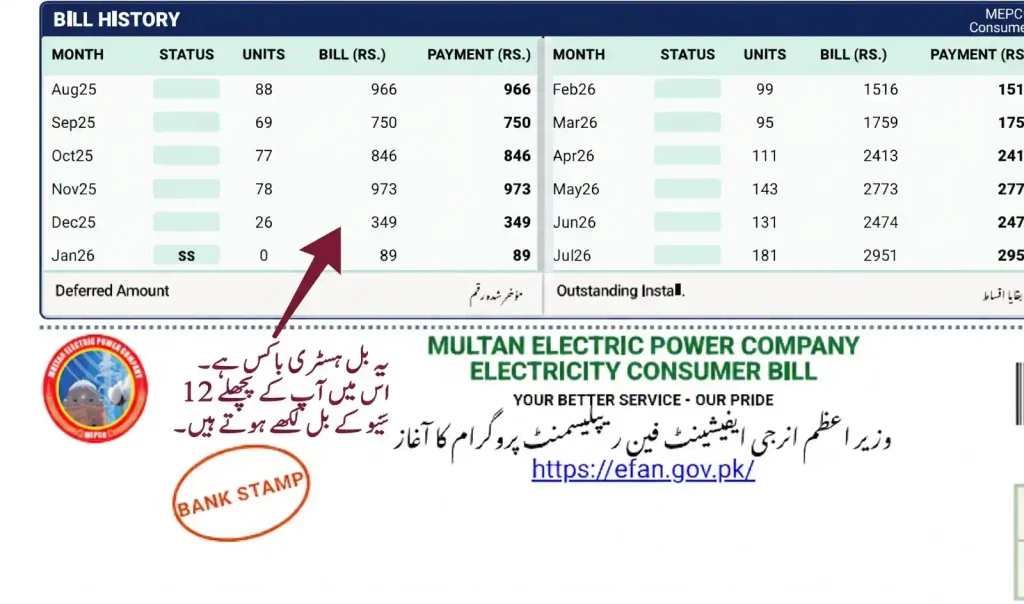
On your monthly MEPCO bill, your previous bill history is also printed so that you can see which month’s bill you paid and how many units you used. This is also a great help because you can use it to plan your budget, and if you use more electricity in any one month, you can take full control in advance to fix it and avoid unnecessary charges. In addition, you can find the exact location of this section by following the details provided, or you can view the picture to locate it directly.
It’s located at the very bottom center of your bill, on the left side. In the bill history box, the names of all months from the past year are listed.
If you look closely, this table contains various columns where, for each month, its Consumed Units, Total Bill Amount, and Payment Date are clearly written.
By reviewing this history, you can check how much your bill was for the same month last year. This way, by systematically tracking your daily unit usage, your bill could be lower than all those previous bills, and you can avoid double taxation.
MEPCO Peak Hours Timetable & Tips to Reduce Your 30% Electricity Bill
| Months | Peak Hours | Off-Peak Hours |
|---|---|---|
| April to October | 6:00 PM to 10:00 PM | 10:00 PM to 6:00 PM the next day |
| November to March | 5:00 PM to 9:00 PM | 9:00 PM to 5:00 PM the next day |
Tips to Lower Your Bill
During peak hours, keep AC, water pumps (motors), and room heaters completely off. This will keep your bill under 200 units and ensure you remain in the protected category.
Never iron clothes during peak hours; it uses the most power and makes the meter run fast because electricity is expensive at that time.
Always run the washing machine, lawn mower, or oven in the morning or afternoon (off-peak hours).
Replace your home's old bulbs with high-quality LED bulbs and use inverter fans.
Pull out mobile and laptop chargers that are left plugged into the outlet, because they still draw power even when idle.
MEPCO Service Areas – Region, Districts and Operation Circles
Customers often have doubts or simply don't know whether their area falls under the MEPCO system or not. MEPCO (Multan Electric Power Company) is actually Pakistan's largest electricity supply company by area, providing power to 13 administrative districts of South Punjab and their hundreds of rural villages. If your area is included in the list below, you can check your bill here. Additionally, if you have moved to these areas or plan to, you will also be MEPCO consumers.
MEPCO Operational Network & Coverage List
| MEPCO Operation Circles | Covered Districts | Major Cities and Surrounding Areas |
|---|---|---|
| Multan Circle | Multan | Multan Cantt, Mumtazabad, Jalalpur Pirwala, Shujabad, Makhdoom Rashid, Basti Maluk. |
| Khanewal Circle | Khanewal | Khanewal City, Kabirwala, Mian Channu, Abdul Hakeem, Jahanian. |
| Vehari Circle | Vehari | Vehari, Burewala, Mailsi, Tibba Sultanpur, Sardar Pur. |
| Lodhran Circle | Lodhran | Lodhran City, Dunyapur, Kehror Pacca. |
| Sahiwal Circle | Sahiwal | Sahiwal City, Chichawatni, Harappa. |
| Pakpattan Circle | Pakpattan | Pakpattan Sharif, Arifwala. |
| Bahawalpur Circle | Bahawalpur | Bahawalpur City, Yazman, Ahmadpur East, Hasilpur, Khairpur Tamewali. |
| Bahawalnagar Circle | Bahawalnagar | Bahawalnagar, Chishtian, Minchinabad, Fort Abbas, Haroonabad. |
| Rahim Yar Khan Circle | Rahim Yar Khan | Rahim Yar Khan, Sadiqabad, Khanpur, Liaqatpur. |
| Muzaffargarh Circle | Muzaffargarh, Kot Addu | Muzaffargarh City, Kot Addu, Alipur, Jatoi. |
| Layyah Circle | Layyah | Layyah City, Choubara, Karor Lal Esan. |
| D.G. Khan Circle | Dera Ghazi Khan, Taunsa | DG Khan City, Taunsa Sharif, Shadan Lund, Fort Munro, Tribal Areas. |
| Rajanpur Circle | Rajanpur | Rajanpur City, Jampur, Rojhan, Mithankot. |
MEPCO Helpline and Complaint Number
If a transformer blows in your area, a power pole falls, or an unexplained prolonged power outage begins, or if someone in your area is openly stealing electricity and won't stop even after you've warned them, then instead of staying silent you should immediately file a complaint and provide evidence of the responsible party so that others will also have the courage to speak up. MEPCO has now launched 24/7 active lines where your complaint is immediately addressed and you receive a tracking number.
Common MEPCO Bill Problems
Often, when people check their Mepco bill, they see “bill not found” or some other error, which causes them to become worried. But now you don't need to worry anymore, because the reasons why your bill is “not found” or shows any other error are all explained here and if you simply follow these instructions, you'll never see these errors again.
If you check your bill and it says “not found,” don't worry. Just try again after a little while, and the issue will resolve itself.
If your internet is slow, your bill won't open, and you'll see an error.
When you check your bill on the 1st of the month and the system returns an error, it means MEPCO is still uploading the new month's data. Because bills in different towns and areas arrive on different dates, the server updates your data accordingly at that time.
If the meter reading is lower but the bill shows a higher amount (overbilling), take a clear picture of the meter's live screen. Take the old bill with you to your nearest Sub-Division WAPDA Office (SDO). They will correct the bill on the spot, print a new one, and then you will have to pay half the amount that is actually due.
Frequently Asked Questions
Q1: How can I perform an online MEPCO bill check for May and September 2026?
You can instantly check and download your bill for May and September 2026, or any current month, by entering your 14-digit reference number in the live toolbox provided above.
Q2: Where can I view my MEPCO bill check history?
You can find a complete table titled “Bill History” in the bottom-left section of your current bill, showing your bill amounts and consumed units for the past 12 months.
Q3: Do I need to enter a 14-digit number for the MEPCO online bill check?
Yes, to view your bill online, you must enter the 14-digit Reference Number or the 10-digit Consumer ID. However, you can now also check your bill via QR code.
Q4: Is there an official method for an online bill check?
Yes, you can check your bill by visiting the official PITC or MEPCO website, or you can fetch the bill directly from the official server using the tool available on our site.
Q5: How can consumers in Multan perform an MEPCO bill check?
All consumers in Multan and South Punjab can enter their identity number in the box provided above to print and download their duplicate bill for free.
Q6: Can I check my MEPCO bill by CNIC number?
Absolutely not. Currently, the MEPCO online portal does not have an option to check a bill using a CNIC.
Conclusion
Now, checking your MEPCO bill online and making secure payments from home has become very easy for every consumer. Thanks to the new QR codes, you're not only protected from extra taxes and fraud, but you can also easily apply for subsidies and win valuable prizes by paying your bill through bank apps.
Additionally, we are an independent informational website and have no direct affiliation with MEPCO or WAPDA. However, all the information on our site is 100% verified and authentic. The bill checker tool provided here is completely genuine and secure as soon as you click “Check Now,” your bill will be fetched directly from MEPCO's main official site and opened on your screen.If you're still having trouble checking or paying your bill, please carefully review the details provided above and follow the steps and tips given to secure affordable electricity and take part in the drawing for a golden opportunity to win numerous prizes.